This post contains broken links Post has incorrect information Post has spam Copyright Issue Other

Storyline Description
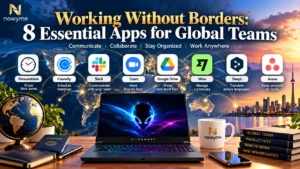
Working with people around the world creates incredible opportunities, but different time zones, currencies, languages, schedules, and communication styles can quickly become complicated. These eight types of apps can help you stay organized, communicate clearly, schedule smarter, and work effectively wherever you or your team are located.
Working Without Borders
The modern workplace is no longer limited by geography. You might live in Canada, collaborate with someone in the United Kingdom, attend a meeting with a client in Nigeria, and send work to someone in Asia—all without leaving your desk.
The opportunity is exciting, but international work creates one obvious question:
How do you keep everything organized when everyone is in a different time zone?
The right apps can make a major difference.
Work Globally, Stay Organized
Working across countries doesn’t have to mean constantly calculating time differences, searching through emails, or wondering whether your colleague is awake.
Build a simple international-work toolkit around:
 Time zones
 Scheduling
 Communication
 Video meetings
 Cloud storage
 Currency conversion
 Translation
 Project management
Technology cannot eliminate every challenge of working internationally, but it can make distance feel considerably smaller.
-
1 A World Clock App — Know When Everyone Is Working
Instead of repeatedly calculating time differences, use a world clock or time-zone app to compare several locations at once. This helps prevent scheduling a meeting at 3:00 a.m. for someone on the other side of the world.
Best for: international teams, meetings, freelancers, and remote workers.
-
2 A Scheduling App — Find a Time That Works for Everyone
Scheduling becomes harder when several time zones are involved. A good scheduling tool can automatically display available times in each person's local zone.
Best for: interviews, client appointments, consultations, and team meetings.
-
3 A Team Communication App — Keep Conversations Together
International teams shouldn't have to depend entirely on email. Team communication apps provide organized conversations, channels, direct messages, file sharing, and notifications.
Best for: everyday collaboration and remote teams.
-
4 A Video Meeting App — Meet Face-to-Face From Anywhere
Sometimes a message isn't enough. Video-conferencing apps allow people in different countries to meet, share screens, give presentations, and collaborate in real time.
Best for: meetings, presentations, training, and interviews.
-
5 A Cloud Storage App — Access Your Work Anywhere
Cloud storage keeps important documents available across computers, phones, and locations.
Instead of asking:
“Can you send me that file again?”
Your team can work from a shared location and, depending on the platform, collaborate on the same documents.
Best for: documents, photos, project files, and collaborative work.
-
6 A Currency Converter — Understand International Costs
If you're working across countries, money can become confusing quickly.
A currency app can help you understand:
CAD → USD
CAD → GBP
CAD → EURand other international conversions.
Best for: freelancers, international clients, travelers, online businesses, and expense planning.
-
7 A Translation App — Reduce Language Barriers
International collaboration often means working with people who do not share the same first language. Translation tools can make it easier to understand unfamiliar words, emails, messages, documents, and everyday conversations.
My preferred option is Google TranslateOpens in a new window [1]. It is convenient, supports many languages, and works well for quick translations when communicating across borders.
Another option is LibreTranslateOpens in a new window [2], which describes itself as a free and open-source machine translation API. One of its main advantages is the ability to self-host it, which may appeal to developers and organizations wanting greater control over their translation infrastructure.
However, my own test produced mixed results. I tested LibreTranslate using this Yoruba passage:
“Ojú ọjọ́ tútù lónìí. Mo jí ní kété, mo sì lọ sí ibi ìdáná láti ṣe oúnjẹ àárọ̀. Ilé náà dakẹ́ rẹ́gẹ́, afẹ́fẹ́ sì ń fẹ́ nínú gbọ̀ngàn. Inú mi dùn láti rí oòrùn tí ń yọ sókè pẹ̀lú ìmọ́lẹ̀ rẹ̀. Lẹ́yìn náà, mo jẹ oúnjẹ mi, mo sì mú omi tutu.”
The passage describes a cool morning: waking early, going to the kitchen to prepare breakfast, noticing the quiet house and breeze, enjoying the sunrise, then eating and drinking cold water.
In my test, LibreTranslate did not translate the passage as accurately as I expected. That doesn't necessarily mean it will perform poorly with every language pair, but it demonstrates an important limitation of machine translation: quality can vary considerably depending on the language and context.
My Pick: Google Translate
For everyday international communication, Google Translate would be my preference because of its accessibility and broad language support. LibreTranslate remains interesting—particularly for people who value open-source and self-hosted software—but I would test it carefully with the specific languages you need before relying on it.
Whichever translation service you choose, remember that machine translation isn't perfect. For legal contracts, medical information, financial documents, immigration material, or other high-stakes communication, use an appropriately qualified human translator or professional review.
Bottom line: Translation tools can help people cross language barriers, but understanding the words and understanding the meaning are not always the same thing.
-
8 A Project-Management App — Keep Everyone Moving Together
When people work at different times, everyone may not be online simultaneously.
That's where project-management software becomes especially useful.
Team members can see:
What needs to be done → Who is responsible → When it's due → What's already completed.
Someone can finish their work in Toronto while another team member begins theirs hours later somewhere else.

Disclaimer - Working Without Borders: 8 Essential Apps for Global Team
The information shared in this post, “Working Without Borders: 8 Essential Apps for Global Team,” is provided by the author and intended for general guidance only. While Nowyme strives to ensure everything is accurate and up to date, we can’t guarantee that all details, products, or services mentioned will always be complete, reliable, or suitable for your needs. Please use your own judgment and double-check anything that matters to you before making decisions based on this content.