

















Enjoy Distraction-Free Reading
Focus on the story without sidebars, navigation, or unnecessary distractions. Enjoy a clean, comfortable reading experience.
Exploring WordPress accessibility tools for better readability, navigation, and inclusive website experiences.
Website accessibility is essential to creating a better online experience. A well-designed website should be easy to read, understand, and navigate, regardless of ability or the devices and assistive technologies people use.
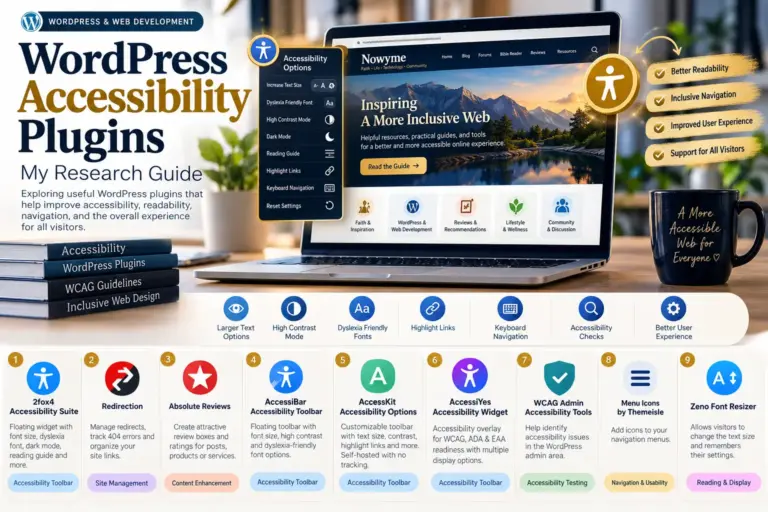
I created this research guide to track WordPress accessibility plugins I discover while exploring ways to improve website usability.
Some of these plugins provide accessibility toolbars that allow visitors to customize their reading experience. Others help website administrators identify accessibility problems or improve specific aspects of navigation and presentation.
My goal is to build a useful reference for myself while sharing what I discover with other WordPress users.
Research disclaimer: The plugins listed here are included for educational and research purposes. Their inclusion does not mean I have tested or endorsed every plugin.
An accessibility plugin cannot automatically make an entire website accessible or guarantee compliance with accessibility laws. Accessibility requires thoughtful website design, proper coding, meaningful content, and regular testing.
Understanding Website Accessibility
Website accessibility means designing and maintaining websites so that people with different abilities can access information and use important features.
This includes visitors who use screen readers, navigate with a keyboard, need larger text, require sufficient colour contrast, or experience other barriers when interacting with websites.
Some important accessibility practices include:
- Providing meaningful alternative text for informative images.
- Using descriptive links and properly structured headings.
- Ensuring menus and forms work with keyboard navigation.
- Maintaining readable text and sufficient colour contrast.
- Allowing visitors to resize text without losing information.
- Avoiding flashing content and unnecessary animation.
- Testing important website features with assistive technologies.
Plugins may help with some of these tasks, but they should support good accessibility practices rather than replace them.
1. Visitor Accessibility Toolbars
These plugins add controls that allow visitors to personalize how they view and interact with website content.
- 2fox4 Accessibility Suite — By 2fox4oliver
- AccessiBar — Accessibility Toolbar
- AccessKit – Accessibility Options Toolbar
- AccessiYes Accessibility Widget — By CookieYes
2. Accessibility Testing and Administration
- WCAG Admin Accessibility Tools — By PluginRx
3. Reading and Display Preferences
- Zeno Font Resizer — By Marcel Pol
4. Related Website Usability Plugins
The following plugins are not dedicated accessibility solutions. However, they may help create a more organized, usable website when implemented carefully.
- Redirection — By John Godley
- Absolute Reviews — By codesupplyco
- Menu Icons by Themeisle
5. What I Look for in an Accessibility Plugin
When researching WordPress accessibility plugins, I consider several important questions.
- Purpose: Does the plugin solve a specific accessibility or usability problem?
- Compatibility: Does it work with my theme, WordPress version, and other installed plugins?
- Keyboard support: Can visitors use the plugin without a mouse?
- Screen-reader support: Are its controls properly labelled and understandable?
- Mobile experience: Does the plugin work on smaller screens without covering important content?
- Performance: Does it introduce unnecessary scripts or affect website responsiveness?
- Privacy: Does it collect visitor information or load resources from outside services?
- Maintenance: Is the plugin actively supported and updated?
I also try to avoid installing multiple plugins that do the same thing, as this can create unnecessary complexity.
6. Accessibility Is More Than Installing Plugins
One important lesson from researching accessibility tools is that installing a toolbar does not automatically remove all accessibility barriers.
For example, a visitor may be able to increase text size while still being unable to use a navigation menu with a keyboard.
Similarly, a high-contrast feature cannot fix an image that lacks a meaningful alternative description.
That is why I believe website owners should focus on fixing accessibility problems in their website’s underlying content, structure, and functionality.
Accessibility plugins can be valuable additions, but they should complement accessible design.
Final Thoughts
Building a more accessible WordPress website is an ongoing process.
The plugins in this collection offer different approaches to improving readability, adjusting website appearance, identifying accessibility issues, and supporting better navigation.
Some may be suitable for visitor-facing accessibility options, while others are more useful to administrators who want to evaluate and improve their websites.
As I continue my WordPress research, I plan to update this collection with additional tools, practical observations, and lessons from testing different plugins.
My goal is not to install as many accessibility plugins as possible. It is to understand how they work and identify which tools can genuinely contribute to a better website experience.
Have you used any of these WordPress accessibility plugins? Feel free to share your experience, recommendations, or suggestions in the comments.
This guide is part of my ongoing WordPress plugin research
12fox4 Accessibility Suite — By 2fox4oliver
2fox4 Accessibility Suite adds a floating accessibility widget to a WordPress website.
Visitors can use the widget to adjust reading and display preferences.
Key features:
- Font resizing.
- Dyslexia-friendly font option.
- High-contrast and dark modes.
- Reading guide.
- Link highlighting.
- Enhanced keyboard focus indicators.
Best for: Website owners exploring customizable accessibility controls for visitors.
My personal research note: I experimented with this plugin, but it triggered a fatal error during my testing. I haven't yet identified the cause, so I need to investigate compatibility before considering it for regular use.
2AccessiBar — Accessibility Toolbar
AccessiBar provides a floating accessibility toolbar with options designed to make website content more comfortable for visitors.
Key features:
- Text-size adjustments.
- High-contrast display mode.
- Dyslexia-friendly font.
- Customizable toolbar appearance.
- Locally hosted functionality.
Best for: Website owners who want a straightforward accessibility toolbar without relying on an external subscription service.
My research note: Its locally hosted approach is interesting, but I would still test how it interacts with the website's theme, mobile layout, and existing accessibility features.
3AccessKit – Accessibility Options Toolbar
AccessKit adds a customizable accessibility toolbar that allows visitors to adjust several aspects of website presentation.
Key features:
- Increase or decrease text size.
- Adjust text spacing and line height.
- Highlight links.
- Modify colour presentation.
- Use reading assistance features.
- Pause certain animations.
- Access browser-based text-to-speech tools.
Best for: Websites looking for several visitor-controlled reading and display options in one plugin.
My research note: I would compare this plugin with other accessibility toolbars before deciding whether its features are needed.
4AccessiYes Accessibility Widget — By CookieYes
AccessiYes provides a floating accessibility widget with options intended to support different visitor preferences.
The plugin includes tools for adjusting text, spacing, colours, and certain reading and navigation behaviours.
Key features:
- Text-size and spacing adjustments.
- Contrast and colour controls.
- Reading assistance.
- Animation controls.
- Configurable accessibility modules.
- Accessibility statement options.
Best for: Website owners who want a configurable accessibility widget with several reading and display features.
Important: Although the plugin is designed to support accessibility efforts, it does not guarantee WCAG conformance or legal compliance.
5WCAG Admin Accessibility Tools — By PluginRx
WCAG Admin Accessibility Tools helps WordPress administrators identify common accessibility issues as they work on their websites.
Unlike plugins that focus mainly on visitor-facing controls, this tool also provides accessibility checks for website owners and editors.
Key features:
- Identify images that may be missing alternative text.
- Check potential colour contrast issues.
- Highlight unclear link text.
- Review heading hierarchy.
- Identify certain link presentation issues.
- Provide a skip-to-content feature.
- Offer optional visitor-facing display tools.
Best for: WordPress administrators, developers, and editors who want help investigating common accessibility problems.
My research note: This plugin is particularly interesting because it focuses on finding issues that can be corrected at their source.
It should still be used alongside other accessibility evaluation tools and manual testing.
6Zeno Font Resizer — By Marcel Pol
Zeno Font Resizer allows visitors to increase or decrease the size of text on a WordPress website.
It provides a simpler approach than a full accessibility toolbar by focusing mainly on text resizing.
Key features:
- Adjustable font sizes.
- Configurable resizing settings.
- Saves visitor preferences using cookies.
- Provides a classic widget.
- Supports integration through PHP code.
Best for: Websites that want a dedicated font-resizing feature without installing a larger accessibility toolbar.
My research note: This could be an option for websites that only need font resizing. However, ensure the website already supports browser zoom and responsive text layouts.
7Redirection — By John Godley
Redirection helps WordPress administrators manage redirects, monitor missing pages, and maintain website links.
Key features:
- Create and manage 301 redirects.
- Monitor 404 errors.
- Manage changed URLs.
- Organize redirect rules.
- Track certain redirect activity.
Best for: Websites that regularly reorganize content or change page addresses.
Accessibility connection: Keeping links working helps visitors, including those using assistive technologies, reach the content they need.
My research note: This is primarily a website management and navigation tool rather than an accessibility plugin.
8Absolute Reviews — By codesupplyco
Absolute Reviews allows website owners to add structured review boxes, ratings, and other review information to posts.
Key features:
- Multiple rating formats.
- Customizable review boxes.
- Pros and cons lists.
- Review criteria and scores.
- Gutenberg integration.
Best for: Blogs and websites that publish product, service, or entertainment reviews.
Accessibility connection: Well-structured reviews can make information easier to understand, but the plugin's actual accessibility depends on how its controls, icons, ratings, and HTML are implemented.
My research note: I would evaluate keyboard access, screen-reader announcements, and rating clarity before considering this an accessibility-supporting tool.
9Menu Icons by Themeisle
Menu Icons by Themeisle allows website administrators to add icons beside navigation menu items.
It supports several icon libraries and image-based icons.
Key features:
- Add icons to WordPress menus.
- Choose from different icon collections.
- Customize icon appearance.
- Support image and SVG icons.
Best for: Websites that want visual cues alongside menu labels.
Accessibility connection: Icons may help some visitors recognize navigation options, but they should not replace clear text labels. Decorative icons should also avoid creating redundant screen-reader announcements.
My research note: I would use this plugin primarily for navigation presentation rather than as a dedicated accessibility improvement.
Enjoy reading Nowyme?
Choose Nowyme as a preferred source on Google to see more of our content in eligible search experiences.
Enjoyed This Article?
Your appreciation means a lot! Give this article a clap to show your support and encourage more inspiring content on Nowyme.
Print This Article
Prefer reading offline? Print a clean, reader-friendly copy of this article.
Print ArticleA clean layout, ideal for saving or printing.



0 Comments