



















Enjoy Distraction-Free Reading
Focus on the story without sidebars, navigation, or unnecessary distractions. Enjoy a clean, comfortable reading experience.
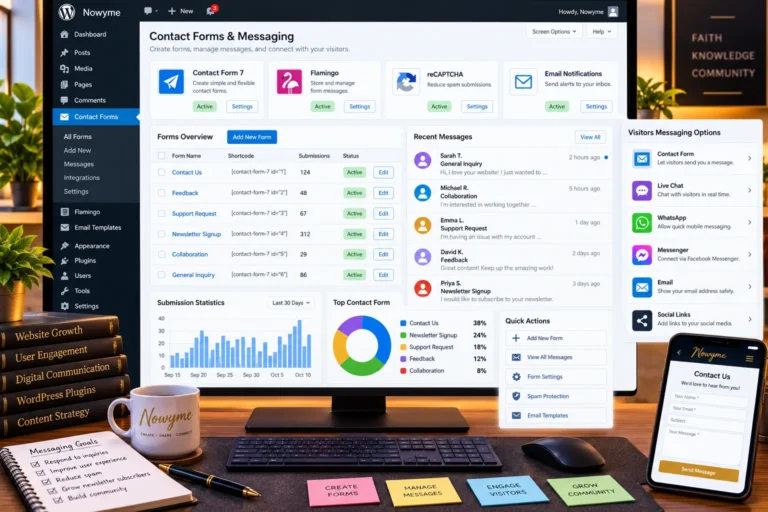
Exploring contact forms, message storage, visitor feedback, and community communication tools.
Communication is essential to building a meaningful, engaging website.
Whether visitors want to ask questions, provide feedback, report a problem, suggest improvements, or simply share their thoughts, a website should make communication straightforward and accessible.
As part of my ongoing WordPress research for Nowyme, I began exploring plugins that improve communication between website administrators and their visitors.
Some plugins focus on contact forms, while others organize messages, add form functionality, or introduce public guestbooks.
I created this article as a personal research collection and a resource for anyone interested in improving visitor communication on WordPress.
Below are five tools worth exploring, including three main plugins and two extensions.
Research note: This guide is based on plugin documentation and research. Inclusion does not mean that every plugin has been personally installed or tested
Part 1: Contact Forms & Form Customization
- Contact Form 7 by Rock Lobster Inc.
- DTX – Dynamic Text Extension for Contact Form 7
Part 2: Message Storage & Administration
- Flamingo by Rock Lobster Inc.
- AC Advanced Flamingo Settings by Richie Arnold
Part 3: Guestbooks & Community Engagement
- Gwolle Guestbook by Marcel Pol
Which Contact & Messaging Plugins Should You Choose?
The best communication tools depend on the website’s needs.
For private enquiries, Contact Form 7 provides a flexible contact form solution.
For stored submissions, Flamingo offers a convenient message archive.
For dynamic article-specific forms, DTX adds additional functionality.
For advanced message management, AC Advanced Flamingo Settings provides optional administrative tools.
For public messages and visitor engagement, Gwolle Guestbook offers a dedicated guestbook experience.
A website does not necessarily need all these tools.
Start with the simplest communication system that meets your needs, then introduce extensions as requirements become clearer.
Final Thoughts
Effective communication tools can help WordPress websites become more welcoming, responsive, and easier to manage.
Contact forms enable private enquiries, message-storage plugins help administrators follow up, and guestbooks give visitors opportunities to contribute publicly.
As I continue exploring WordPress plugins, I plan to expand this research collection with more communication tools, practical setup notes, and testing observations.
Which WordPress contact or messaging plugins have you found most useful? Share your experiences and recommendations in the comments.
Editor’s Note: This article is part of my ongoing WordPress research. Plugin availability, compatibility, features, and security information may change.
Research reviewed: October 17, 2026.
1Contact Form 7 by Rock Lobster Inc.
Category: Contact Forms & Visitor Communication
Developer: Rock Lobster Inc. / Takayuki Miyoshi
Official Plugin:Opens in a new windowhttps://wordpress.org/plugins/contact-form-7/Opens in a new window
Overview
Contact Form 7 is a free, open-source WordPress plugin designed to create and manage contact forms.
It lets administrators build forms with different fields, customize email notifications, and give visitors a convenient way to communicate.
Its flexible form configuration makes it suitable for contact pages, feedback forms, general enquiries, and other website communication needs.
Key Features
- Create and manage multiple contact forms
- Text, email, telephone, and message fields
- Required-field validation
- Customizable email notification templates
- Support for file uploads
- Form shortcodes and a WordPress editor block
- Spam protection integrations
- Extensibility through third-party add-ons
Why Consider It?
Contact Form 7 provides a flexible foundation for managing website enquiries without requiring visitors to register for an account.
It also supports different form types for different website purposes.
Potential Advantages
- Free and open-source
- Flexible form configuration
- Large plugin ecosystem
- Customizable email notifications
- Suitable for simple and advanced forms
Important Considerations
Contact Form 7 does not store form submissions in the WordPress database by default.
Email delivery therefore needs proper configuration and testing, especially when a website receives important enquiries.
For message storage, a companion plugin such as Flamingo may be useful.
Nowyme Research Notes
Contact Form 7 would be a strong foundation for Nowyme's Contact Us page.
I would create a simple form with fields for name, email address, enquiry category, and message.
Additional fields should be introduced only when necessary to avoid making the form difficult to complete.
Explore the Plugin:Opens in a new windowhttps://wordpress.org/plugins/contact-form-7/Opens in a new window
2DTX – Dynamic Text Extension for Contact Form 7
Developer: sevenspark
Category: Dynamic Form Fields & Automation
Official Plugin:Opens in a new windowhttps://wordpress.org/plugins/contact-form-7-dynamic-text-extension/Opens in a new window
Overview
DTX – Dynamic Text Extension adds dynamic field functionality to Contact Form 7.
Instead of requiring visitors to type information that the website already knows, the plugin can automatically populate selected form fields.
For example, a contact form opened from an article could automatically include the current article's title or URL.
Key Features
- Prepopulate form fields dynamically
- Retrieve current post titles and URLs
- Include post IDs and slugs
- Access selected WordPress user information
- Use custom fields and metadata
- Populate different form field types
- Generate unique identifiers
- Support shortcode-based dynamic values
Why Consider It?
Dynamic fields can make forms easier to complete and give administrators more useful context when they receive enquiries.
For example, a visitor reporting an error in a WordPress tutorial would not need to manually copy and paste the article URL.
Potential Advantages
- More contextual form submissions
- Less repetitive data entry
- Easier article-specific enquiries
- Flexible form customization
- Useful for support and feedback workflows
Important Considerations
Dynamic field values should be validated rather than automatically trusted.
Website administrators should also avoid exposing private user information through automatically populated fields.
Nowyme Research Notes
This extension could be particularly useful for a "Report a Problem" or "Ask About This Article" form.
I would consider it only after the basic contact form is functioning properly, and the current security status has been reviewed.
Explore the Plugin:Opens in a new windowhttps://wordpress.org/plugins/contact-form-7-dynamic-text-extension/Opens in a new window
3Flamingo by Rock Lobster Inc.
Developer: Rock Lobster Inc.
Category: Contact Form Message Storage
Official Plugin:Opens in a new windowhttps://wordpress.org/plugins/flamingo/Opens in a new window
Overview
Flamingo is a message storage plugin developed as a companion to Contact Form 7.
While Contact Form 7 processes form submissions and sends notifications, Flamingo stores submitted messages inside the WordPress database.
This provides administrators with a searchable record of messages received through their forms.
Key Features
- Store Contact Form 7 submissions
- Search previously received messages
- View messages through the WordPress dashboard
- Organize inbound messages
- Maintain a contact address book
- Access records when email delivery fails
Why Consider It?
Email delivery issues can occasionally prevent website administrators from receiving form notifications.
Flamingo provides a second place to retrieve submissions, helping reduce the risk of overlooking enquiries.
Potential Advantages
- Centralized message storage
- Searchable submission history
- Convenient WordPress administration interface
- Integration with Contact Form 7
- Useful for investigating email delivery problems
Important Considerations
Messages stored by Flamingo may contain personal information.
Restrict access to authorized administrators, and ensure stored messages are covered by an appropriate privacy and retention policy.
Nowyme Research Notes
Flamingo would be a useful companion to Contact Form 7 if Nowyme needs to retain enquiries or follow up on submitted messages.
I would review stored messages regularly and avoid keeping personal information longer than necessary.
Explore the Plugin:Opens in a new windowhttps://wordpress.org/plugins/flamingo/Opens in a new window
4AC Advanced Flamingo Settings by Richie Arnold
Category: Message Management & Flamingo Extensions
Official Plugin:Opens in a new windowhttps://wordpress.org/plugins/ac-advanced-flamingo-settings/Opens in a new window
Overview
AC Advanced Flamingo Settings provides additional functionality for websites using Flamingo.
Its features focus on message organization, import and export operations, and optional management of submitted files.
Key Features
- Import and export Flamingo messages
- JSON-based message backups and migrations
- Duplicate-message detection during imports
- Optional persistent file-upload storage
- Uploaded file management
- Administrative menu customization
- Option to disable the Flamingo address book
Why Consider It?
For websites that receive large numbers of contact form submissions, additional management and organization features may help.
The plugin can also support migration and backup workflows.
Important Considerations
Exported messages and stored attachments may contain sensitive information.
Files and exported records should be protected from public access and deleted according to an appropriate retention policy.
Nowyme Research Notes
I would treat this plugin as optional.
Install it only if Flamingo's existing message-management tools become insufficient.
Explore the Plugin:Opens in a new windowhttps://wordpress.org/plugins/ac-advanced-flamingo-settings/Opens in a new window
5Gwolle Guestbook by Marcel Pol
Developer: Marcel Pol
Category: Guestbooks & Visitor Engagement
Official Plugin:Opens in a new windowhttps://wordpress.org/plugins/gwolle-gb/Opens in a new window
Overview
Gwolle Guestbook allows WordPress websites to create a dedicated guestbook where visitors can leave public messages.
Unlike traditional contact forms, which are generally for private communication, a guestbook gives visitors a space to share greetings, feedback, and other public comments.
It also offers a different experience from WordPress's standard comments section.
Key Features
- Dedicated guestbook form
- Public guestbook entries
- Administrative moderation
- Email notifications
- Paginated or infinite-scroll messages
- Guestbook widgets
- Customizable form fields
- Shortcode integration
- Import tools for selected guestbook systems
Why Consider It?
A guestbook creates a welcoming space for visitors to acknowledge a website, leave encouraging messages, or share brief experiences.
It may be especially useful for personal websites, portfolios, community projects, and organizations seeking public visitor feedback.
Potential Advantages
- Dedicated visitor message area
- Public interaction
- Administrative moderation tools
- Flexible display options
- Simple WordPress integration
Important Considerations
Public guestbooks require active moderation.
Spam, promotional messages, abusive content, and accidental disclosure of personal information should be considered before allowing unrestricted posting.
Nowyme Research Notes
Gwolle Guestbook could support Nowyme's community-oriented identity.
I would consider creating a dedicated page called "Nowyme Guestbook" or "Leave a Message" where readers could share encouragement, feedback, and thoughts.
However, a public guestbook should complement, not replace, private contact forms or discussion forums.
Explore the Plugin:Opens in a new windowhttps://wordpress.org/plugins/gwolle-gb/Opens in a new window
Enjoy reading Nowyme?
Choose Nowyme as a preferred source on Google to see more of our content in eligible search experiences.
Enjoyed This Article?
Your appreciation means a lot! Give this article a clap to show your support and encourage more inspiring content on Nowyme.
Print This Article
Prefer reading offline? Print a clean, reader-friendly copy of this article for personal reference.



0 Comments