

















Enjoy Distraction-Free Reading
Focus on the story without sidebars, navigation, or unnecessary distractions. Enjoy a clean, comfortable reading experience.
Storyline Description
Working with people around the world creates incredible opportunities, but different time zones, currencies, languages, schedules, and communication styles can quickly become complicated. These eight types of apps can help you stay organized, communicate clearly, schedule smarter, and work effectively wherever you or your team are located.
Working Without Borders
The modern workplace is no longer limited by geography. You might live in Canada, collaborate with someone in the United Kingdom, attend a meeting with a client in Nigeria, and send work to someone in Asia—all without leaving your desk.
The opportunity is exciting, but international work creates one obvious question:
How do you keep everything organized when everyone is in a different time zone?
The right apps can make a major difference.
Work Globally, Stay Organized
Working across countries doesn't have to mean constantly calculating time differences, searching through emails, or wondering whether your colleague is awake.
Build a simple international-work toolkit around:
 Time zones
 Scheduling
 Communication
 Video meetings
 Cloud storage
 Currency conversion
 Translation
 Project management
Technology cannot eliminate every challenge of working internationally, but it can make distance feel considerably smaller.
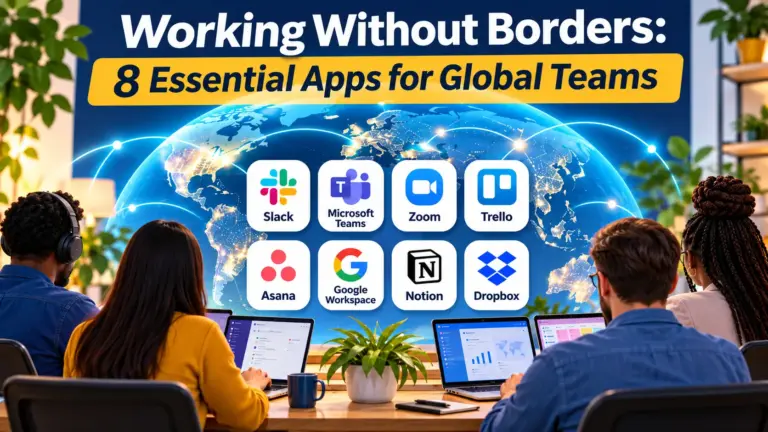
Recommended apps for all eight categories
I would retain your existing eight sections but strengthen them with the following practical recommendations.
Category | Recommended app | Alternative |
|---|---|---|
1. World clock | World Time Buddy | timeanddate Meeting Planner |
2. Scheduling | Calendly | Google Calendar |
3. Team communication | Slack | Microsoft Teams |
4. Video meetings | Zoom | Google Meet |
5. Cloud storage | Google Drive | Microsoft OneDrive |
6. Currency conversion | XE Currency | Wise |
7. Translation | Google Translate | LibreTranslate |
8. Project management | Trello | Asana |
✦ Author's Research Note: Technology Should Make Collaboration Easier
Working with people across different countries has become increasingly accessible, but successful international collaboration involves more than having an internet connection and installing a collection of applications.
It requires thoughtful communication, respect for different working hours, careful organization, and an understanding that people may work within different cultural, professional, and technological environments.
One lesson I believe is particularly important is that the best application is not necessarily the one with the greatest number of features, but the one that solves a real problem effectively.
A sophisticated scheduling tool may be unnecessary for a small team that only meets occasionally. Similarly, a large project-management platform may create more complexity than value when a simple shared task board would be sufficient.
The same principle applies to translation tools.
In my exploration of Google Translate and LibreTranslate, I found that the results of a particular translation task did not always meet my expectations. This reinforced the importance of testing technology rather than assuming that every application will perform equally well in every situation.
For international teams, I recommend choosing tools based on practical needs, ease of use, reliability, accessibility, privacy, and overall cost.
Technology should support the people doing the work, not become another obstacle they must constantly manage.
Work across borders, but do not overlook the importance of clear communication, mutual respect, and responsible collaboration.
— Boluwatife Emmanuel Osisanya
Nowyme | Technology & Digital Life
Research, Testing & Editorial Note
The applications discussed in this article are presented as examples of tools that may help individuals and teams collaborate across international borders.
Recommendations are based on the practical functions of each application, publicly available product information, and personal observations where specifically indicated.
Independent Testing: The Google Translate and LibreTranslate discussion includes a personal translation test using a Yoruba-language passage. The observations represent the results of that particular test and should not be interpreted as a comprehensive scientific evaluation of either service.
Product Information: Features, subscription plans, free-tier limitations, supported languages, integrations, and service availability may change over time. Readers are encouraged to consult each provider's official website before making decisions.
Privacy and Security: Before uploading confidential business files, personal information, customer records, or sensitive documents, review the relevant application's privacy policy, data-handling practices, access controls, and applicable organizational requirements.
Currency Information: Exchange-rate estimates are provided for general information and planning. Actual conversion rates and transaction fees depend on the financial institution or payment provider.
Editorial Independence: Product preferences expressed in this article reflect the author's stated assessment and should not be interpreted as endorsements or guarantees of performance.
This article is intended for general educational and informational purposes.
Author: Boluwatife Emmanuel Osisanya
Publication: Nowyme — Technology & Digital Life
Working Without Borders: Bringing It All Together
The ability to work with people around the world opens the door to new opportunities, professional relationships, and creative possibilities.
However, successful global collaboration requires more than simply connecting people through technology.
It requires organization, clear expectations, thoughtful scheduling, reliable communication, and respect for the different circumstances in which people work.
The eight categories of applications discussed in this article can help address many of these challenges.
You do not need to install every application or subscribe to every service. Start by identifying the difficulties your team experiences most often.
If scheduling meetings is a challenge, begin with a reliable time-zone and scheduling solution.
If important messages are becoming difficult to follow, improve your team communication system.
If projects are delayed because responsibilities are unclear, introduce a shared project-management tool.
And if language differences are causing misunderstandings, consider a translation service while recognizing the importance of human understanding and cultural context.
The goal is not to collect more apps. The goal is to create a simpler, more effective way of working together.
The world may be divided by geography and time zones, but with the right tools, thoughtful planning, and clear communication, distance does not have to prevent meaningful collaboration.
✦ Final Thought
Work across borders. Communicate with clarity. Respect different time zones. Stay organized. Let technology bring people together.
✧ Explore • Connect • Collaborate • Grow.
Nowyme — Technology & Digital Life
1A World Clock App — Know When Everyone Is Working
Instead of repeatedly calculating time differences, use a world clock or time-zone app to compare several locations at once. This helps prevent scheduling a meeting at 3:00 a.m. for someone on the other side of the world.
Best for: international teams, meetings, freelancers, and remote workers.
2A Scheduling App — Find a Time That Works for Everyone
Scheduling becomes harder when several time zones are involved. A good scheduling tool can automatically display available times in each person's local zone.
Best for: interviews, client appointments, consultations, and team meetings.
3 A Team Communication App — Keep Conversations Together
International teams shouldn't have to depend entirely on email. Team communication apps provide organized conversations, channels, direct messages, file sharing, and notifications.
Best for: everyday collaboration and remote teams.
4 A Video Meeting App — Meet Face-to-Face From Anywhere
Sometimes a message isn't enough. Video-conferencing apps allow people in different countries to meet, share screens, give presentations, and collaborate in real time.
Best for: meetings, presentations, training, and interviews.
5A Cloud Storage App — Access Your Work Anywhere
Cloud storage keeps important documents available across computers, phones, and locations.
Instead of asking:
“Can you send me that file again?”
Your team can work from a shared location and, depending on the platform, collaborate on the same documents.
Best for: documents, photos, project files, and collaborative work.
6 A Currency Converter — Understand International Costs
If you're working across countries, money can become confusing quickly.
A currency app can help you understand:
CAD → USD
CAD → GBP
CAD → EURand other international conversions.
Best for: freelancers, international clients, travelers, online businesses, and expense planning.
Important: Exchange Rates Are Not Always Final Payment Rates
Currency converters are useful for estimating international costs, but the rate displayed by a converter may differ from the rate applied by a bank, payment platform, or money-transfer service.
Additional costs may include conversion markups, transfer fees, and payment processing charges.
Before sending money or agreeing to an international payment, confirm the final exchange rate, applicable fees, and the amount the recipient will actually receive.
My tip: Use a currency converter for initial planning, but check the actual payment provider's quote before making financial commitments.
7 A Translation App — Reduce Language Barriers
International collaboration often means working with people who do not share the same first language. Translation tools can make it easier to understand unfamiliar words, emails, messages, documents, and everyday conversations.
My preferred option is Google Translate. It is convenient, supports many languages, and works well for quick translations when communicating across borders.
Another option is LibreTranslate, which describes itself as a free and open-source machine translation API. One of its main advantages is the ability to self-host it, which may appeal to developers and organizations wanting greater control over their translation infrastructure.
However, my own test produced mixed results. I tested LibreTranslate using this Yoruba passage:
“Ojú ọjọ́ tútù lónìí. Mo jí ní kété, mo sì lọ sí ibi ìdáná láti ṣe oúnjẹ àárọ̀. Ilé náà dakẹ́ rẹ́gẹ́, afẹ́fẹ́ sì ń fẹ́ nínú gbọ̀ngàn. Inú mi dùn láti rí oòrùn tí ń yọ sókè pẹ̀lú ìmọ́lẹ̀ rẹ̀. Lẹ́yìn náà, mo jẹ oúnjẹ mi, mo sì mú omi tutu.”
The passage describes a cool morning: waking early, going to the kitchen to prepare breakfast, noticing the quiet house and breeze, enjoying the sunrise, then eating and drinking cold water.
In my test, LibreTranslate did not translate the passage as accurately as I expected. That doesn't necessarily mean it will perform poorly with every language pair, but it demonstrates an important limitation of machine translation: quality can vary considerably depending on the language and context.
My Pick: Google Translate
For everyday international communication, Google Translate would be my preference because of its accessibility and broad language support. LibreTranslate remains interesting—particularly for people who value open-source and self-hosted software—but I would test it carefully with the specific languages you need before relying on it.
Whichever translation service you choose, remember that machine translation isn't perfect. For legal contracts, medical information, financial documents, immigration material, or other high-stakes communication, use an appropriately qualified human translator or professional review.
Bottom line: Translation tools can help people cross language barriers, but understanding the words and understanding the meaning are not always the same thing.
A Note About My Translation Test
My comparison of Google Translate and LibreTranslate reflects my experience with a specific Yoruba passage. The test was intended to assess how well the tools handled natural everyday language, rather than to establish a comprehensive ranking of translation services.
Translation quality may vary according to the language pair, expressions used, available language models, and the particular version or configuration of a service.
For this reason, I encourage readers to test translation tools using the languages and types of communication most relevant to their needs.
My recommendation: Use automated translation for everyday assistance, but obtain qualified human review when accuracy, cultural meaning, confidentiality, or legal consequences are especially important.
8A Project-Management App — Keep Everyone Moving Together
When people work at different times, everyone may not be online simultaneously.
That's where project-management software becomes especially useful.
Team members can see:
What needs to be done → Who is responsible → When it's due → What's already completed.
Someone can finish their work in Toronto while another team member begins theirs hours later somewhere else.
Enjoy reading Nowyme?
Choose Nowyme as a preferred source on Google to see more of our content in eligible search experiences.
Enjoyed This Article?
Your appreciation means a lot! Give this article a clap to show your support and encourage more inspiring content on Nowyme.
Print This Article
Prefer reading offline? Print a clean, reader-friendly copy of this article.
Print ArticleA clean layout, ideal for saving or printing.



0 Comments