









📚 Last reviewed and updated on June 28, 2026 • Written by thoughtsunwritten
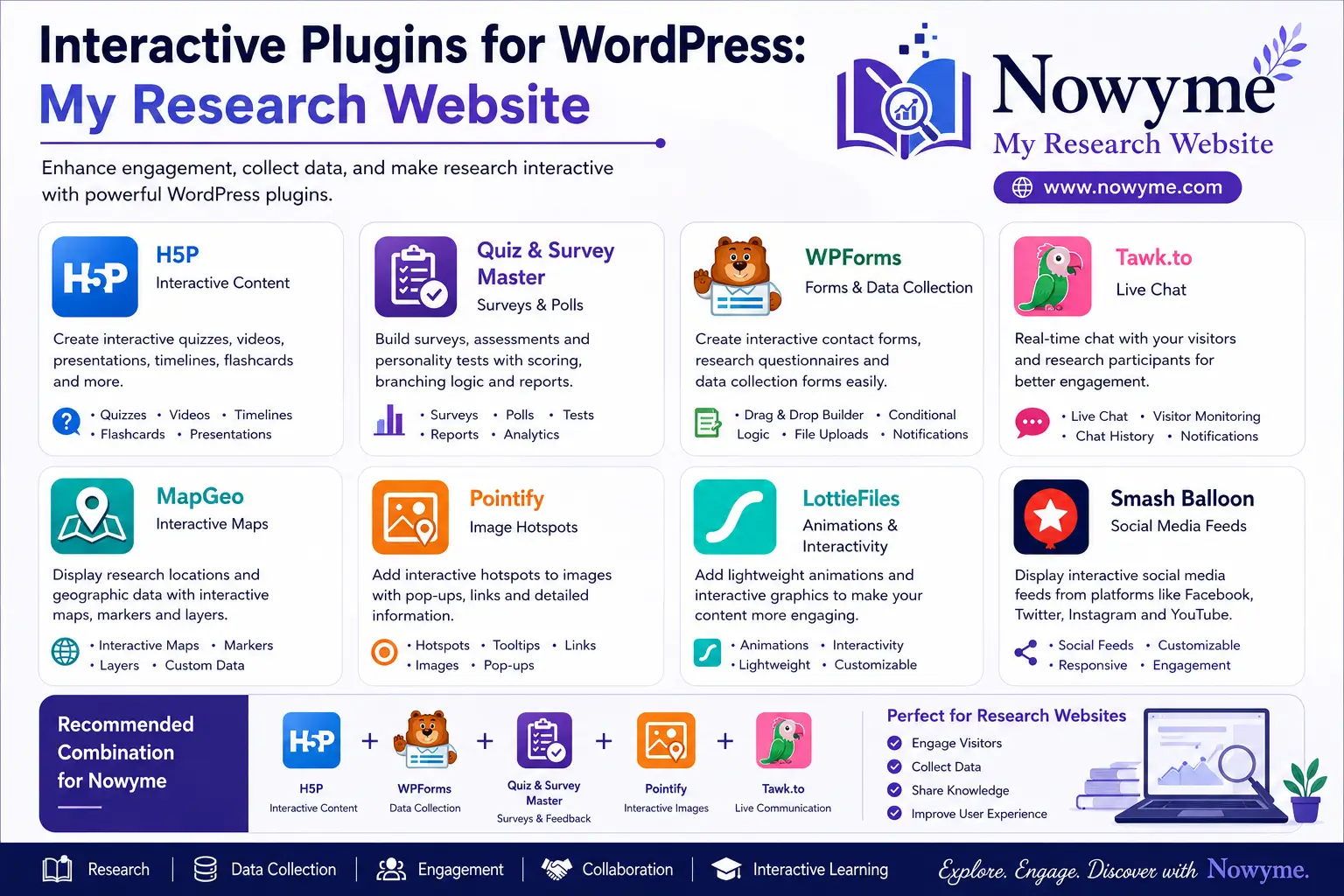
In a world overflowing with information, making research feel personal, interactive, and truly engaging is more important than ever. That’s what I’m aiming for with Nowyme – My Research Website. I’m always on the lookout for tools that break down barriers, invite real participation, and turn research into a shared experience—not just a static web page.
Why I Use Interactive Plugins
For me, interactive plugins are game-changers. They don’t just add bells and whistles—they transform the way people connect with knowledge. With the right tools, visitors aren’t just reading—they’re exploring, giving feedback, and helping shape the conversation. These plugins help me:
- Gather real insights and feedback from readers
- Make complex ideas easier (and more fun) to understand
- Create opportunities for collaboration
- Build a space where every visitor feels involved
This post is my own running list of interactive WordPress plugins I’ve found useful. Whether it’s quizzes, polls, forms, or other hands-on features, each plugin here has helped me make my site more vibrant and welcoming. I’ve included my own notes on what works, what stands out, and how these tools can help you build a more engaging research site, too.
1Post Reaction – Add Like or Emoji Reactions to Posts By bPlugins
Post Reactions is a WordPress plugin that lets you track and display user reactions, such as likes, loves, and custom emojis, on your posts. Each user can react only once per post, which helps keep your data accurate. The plugin makes it easy to see which content gets the most engagement, helping you improve your posts. It’s simple to set up and customize to match your site’s design.
Plugin Link: https://wordpress.org/plugins/post-reaction/Opens in a new window
2 AboveWP Page Loader By AboveWP
AboveWP Page Loader adds a customizable loading screen to your WordPress site. It shows while the page loads and fades out smoothly, giving your site a more polished and professional look.
Plugin LinK: https://wordpress.org/plugins/abovewp-page-loader/Opens in a new window
3Ace Tic Tac Toe By Acewebx
This plugin lets you add a classic Tic Tac Toe game to your WordPress site using the [tic_tac_toe] shortcode. It works smoothly on both desktop and mobile devices.
Plugin Link: https://wordpress.org/plugins/acewebx-tic-tac-toe/Opens in a new window
4Image Zoom on Hover By Mathew
Image Zoom on Hover adds interactive zoom to your WordPress images. Visitors can click on images to see them in full-screen detail, making your site more engaging and professional.
Plugin Link: https://wordpress.org/plugins/image-zoom-on-hover/Opens in a new window
5TOCCraft – Modern Table of Contents By Secil Kars
TOCCraft – Modern Table of Contents automatically creates a simple, responsive table of contents from your post and page headings.
Plugin Link: https://wordpress.org/plugins/toccraft-modern-table-of-contents/Opens in a new window
6Add Widget After Content By Arelthia Phillips
7Ivory Search – WordPress Search Plugin By Vinod Dalvi
8Seriously Simple Podcasting By Craig Hewitt
9 Abs – Additional block styles By WebMan Design | Oliver Juhas
This plugin adds new creative styles to your WordPress blocks in the Gutenberg editor. Just activate it to access the new block styles and use them in your content.
Plugin Link: https://wordpress.org/plugins/additional-block-styles/Opens in a new window
10 Essential Addons for Elementor – Popular Elementor Templates & Widgets By WPDeveloper
11SiteOrigin Widgets Bundle By Greg – SiteOrigin
12Word Balloon By YAHMAN
13Advanced Reading Progress & View Counter By teckut
14 Adventura – Interactive Advent Calendar By dimendia
15Shortcodes – Advanced Shortcode Manager By BeautifulPlugins
16 Article Read Time Lite – WordPress plugin for displaying total reading time and progress bar By WP Shuffle
17Back To The Top Button By yydevelopment
18Blog Post Reading Time By Rathod Narendrasinh
19Wbcom Designs – Birthday Widget for BuddyPress By wbcomdesigns
20Word Balloon By YAHMAN

Disclaimer - Interactive Plugins for WordPress: My Research
The information shared in this post, “Interactive Plugins for WordPress: My Research,” is provided by the author and intended for general guidance only. While Nowyme strives to ensure everything is accurate and up to date, we can’t guarantee that all details, products, or services mentioned will always be complete, reliable, or suitable for your needs. Please use your own judgment and double-check anything that matters to you before making decisions based on this content.


0 Comments